
Table of Contents
Mastering Stripe and PayPal Reconciliation for Shopify in Vancouver
Vancouver’s e-commerce scene is booming, with Shopify stores driving innovation amid rising online sales. For local merchants, mastering Stripe and PayPal reconciliation for Shopify in Vancouver is key to handling multi-gateway payments smoothly.
Payment reconciliation means matching your Shopify sales records with actual bank deposits from processors like Stripe and PayPal. Common hurdles include transaction fees, refunds, and payout delays, which can complicate GST/HST reporting in Canada. According to Shopify guides, unreconciled accounts face up to 20% error rates, risking tax discrepancies. Think of it like balancing a checkbook for your digital storefront–ensuring every sale aligns with inflows for accurate bookkeeping. Shopify Stripe reconciliation tackles direct card payments, while PayPal Shopify reconciliation handles wallet transactions; both demand careful multi-gateway payment matching for Vancouver e-commerce transaction alignment.
This guide outlines a 7-step process, from exporting reports to verifying deposits, drawing on PayPal reconciliation basics like matching payouts to Shopify orders. It equips you with tools for seamless integration with QuickBooks or Xero.
As a Vancouver expert, Transcounts offers automated solutions for Shopify Payouts Vancouver, simplifying reconciliation during peak holiday rushes and supporting your business growth.
Preparing for Stripe and PayPal Reconciliation in Shopify
Before diving into Stripe and PayPal reconciliation for Shopify in Vancouver, ensure your foundational elements are in place to avoid common pitfalls. Proper preparation streamlines the process, especially for Canadian e-commerce sellers dealing with sales tax nexus and multi-currency transactions. Start by assessing your Shopify admin access and payment settings to confirm everything aligns for seamless data flow.
Key preparatory steps for gateway matching in Vancouver include:
- Verify Shopify admin access and review payment settings under Settings > Payments to ensure gateways are active.
- Confirm Stripe and PayPal connections in Shopify’s gateway settings; for Shopify Stripe reconciliation, check API keys as per integration guides, which note that secure API connections prevent 80% of mismatches from poor setups.
- For PayPal Shopify reconciliation, validate account linking and test a small transaction to confirm real-time syncing.
- Gather required documents like recent bank statements and transaction exports for cross-verification.
- Review a test period’s transaction history to identify any discrepancies early.
- Back up your Shopify data to safeguard against integration errors.
To automate, consider tools for initial alignment for Shopify payments. Apps like A2X simplify matching by categorizing payouts directly into your accounting software. For detailed a2x setup for shopify vancouver, follow the onboarding process to connect your gateways securely, answering how to automate Stripe and PayPal reconciliation for Shopify stores.
In Vancouver, address CAD/USD conversions and provincial sales taxes during setup–unverified currencies can lead to reporting errors under Canadian regulations. Warn against overlooking these, as they impact nexus compliance.
With setups complete, start reviewing your data for the first reconciliation step.
Reviewing Orders in Your Shopify Dashboard
For e-commerce sellers in Vancouver, effective Stripe and PayPal reconciliation for Shopify in Vancouver begins with thorough order review. This step ensures accurate matching of sales data across payment processors, preventing discrepancies in your financial records. By organizing order information upfront, Vancouver-based stores can streamline their bookkeeping processes efficiently.
To start, follow these numbered steps for accessing and exporting data:
- Log into your Shopify admin dashboard using secure credentials.
- Navigate to the Orders section in the left sidebar.
- Filter orders by date range, selecting the relevant period, and by payment method–Stripe for Shopify Stripe reconciliation or PayPal for PayPal Shopify reconciliation.
- Review key details like order IDs, totals, processing fees, and any refunds.
- Export as a CSV file, including essential fields such as order number, amount, transaction ID, and payment gateway, as recommended in Shopify’s reconciliation guides for precise matching.
Accurate order data preparation in Vancouver stores matters because it prevents revenue leaks from unmatched transactions, ensuring compliance and clean books for tax reporting. Mismatched fees or refunds can distort your profit margins, leading to costly audits.
For high-volume stores, refine filters by status or customer to avoid overwhelming exports. Always adjust for Pacific Time zones in Vancouver to align order timestamps correctly with bank statements. Now, export this data for processor comparison in the next step.
Exporting Transaction Data from Stripe
For effective Stripe and PayPal reconciliation for Shopify in Vancouver, exporting transaction data from Stripe is essential to align payouts with Shopify orders. This process captures detailed records of fees, disputes, and net amounts in CAD, ensuring accurate bookkeeping for local e-commerce sellers.
To begin, log into your Stripe dashboard and navigate to the Payments or Balance section. Filter transactions by date range and select those linked to Shopify via payment method or metadata tags. Download the CSV report, which includes transaction IDs, gross amounts, processing fees, and net payouts–key fields for Shopify Stripe reconciliation. Verify all entries reflect Canadian dollar processing to match Shopify’s order totals.
This export matters because it reveals processor-specific adjustments like Stripe’s variable fees, which can impact net revenue by 2.9% plus 30 cents per transaction. For example, a $1,000 sale might net $969 after fees, highlighting the need for precise tracking in Vancouver’s competitive market.
For tips, handle refunds by exporting separate dispute reports to avoid double-counting. Set up webhooks through Shopify Stripe integration for automated data pulls, reducing manual errors. Vancouver sellers should batch exports monthly to streamline Stripe data export for Vancouver e-commerce. Consider Psp Fee Analysis Vancouver Ecommerce for deeper insights into optimizing these costs.
Pulling Reports from PayPal
For effective Stripe and PayPal reconciliation for Shopify in Vancouver, extracting detailed reports from your PayPal account is essential. This step builds on the Stripe export from Step 2, providing the necessary data to align payouts with Shopify orders. Vancouver merchants can streamline PayPal Shopify reconciliation by focusing on transaction details that match seller platforms.
To begin, log into your PayPal business account via the website or mobile app for flexibility on the go. Navigate to the Reports section, select Activity, and apply filters for the relevant Shopify sales period, such as monthly or quarterly dates. Download the CSV file, which includes key fields like transaction IDs, gross amounts, fees deducted, and net payouts–key fields for Shopify sales paid via PayPal, enable precise matching of orders. Note any currency conversions, especially for CAD transactions common among Canadian users.
This process ensures accurate fee tracking, crucial for tax compliance and financial reporting in Vancouver’s e-commerce scene. By verifying gross versus net figures, you avoid discrepancies that could complicate audits or budgeting.
For tips on international payouts, watch for varying CAD fee structures that differ from USD; use PayPal export strategies for Vancouver merchants to consolidate multi-currency data. Once exported, prepare to merge these files in Step 4 for comprehensive reconciliation.
Matching Transactions Across Platforms
In the process of Stripe and PayPal reconciliation for Shopify in Vancouver, step four focuses on aligning exported transaction data using order IDs and payment amounts. This manual or semi-automated approach ensures accurate cross-platform transaction linking in Vancouver by importing CSVs from Stripe, PayPal, and Shopify into a spreadsheet like Google Sheets.
Begin by uploading the CSV files into separate sheets within your workbook. To match records, use the VLOOKUP function on order IDs: for Shopify Stripe reconciliation, enter =VLOOKUP(A2, 'Stripe Sheet'!A:B, 2, FALSE) to pull amounts from the Stripe column, where A2 is the Shopify order ID. This addresses the question of the best way to match Stripe transactions to Shopify sales.
For PayPal Shopify reconciliation, apply a similar formula but adjust for fees: =VLOOKUP(B2, 'PayPal Sheet'!B:C, 2, FALSE) - (total * fee_rate), subtracting the typical 2.9% + $0.30 processing fee to net the true sale amount. Flag discrepancies by conditional formatting if totals or dates do not align, and categorize entries as matched or pending using pivot tables for summaries.
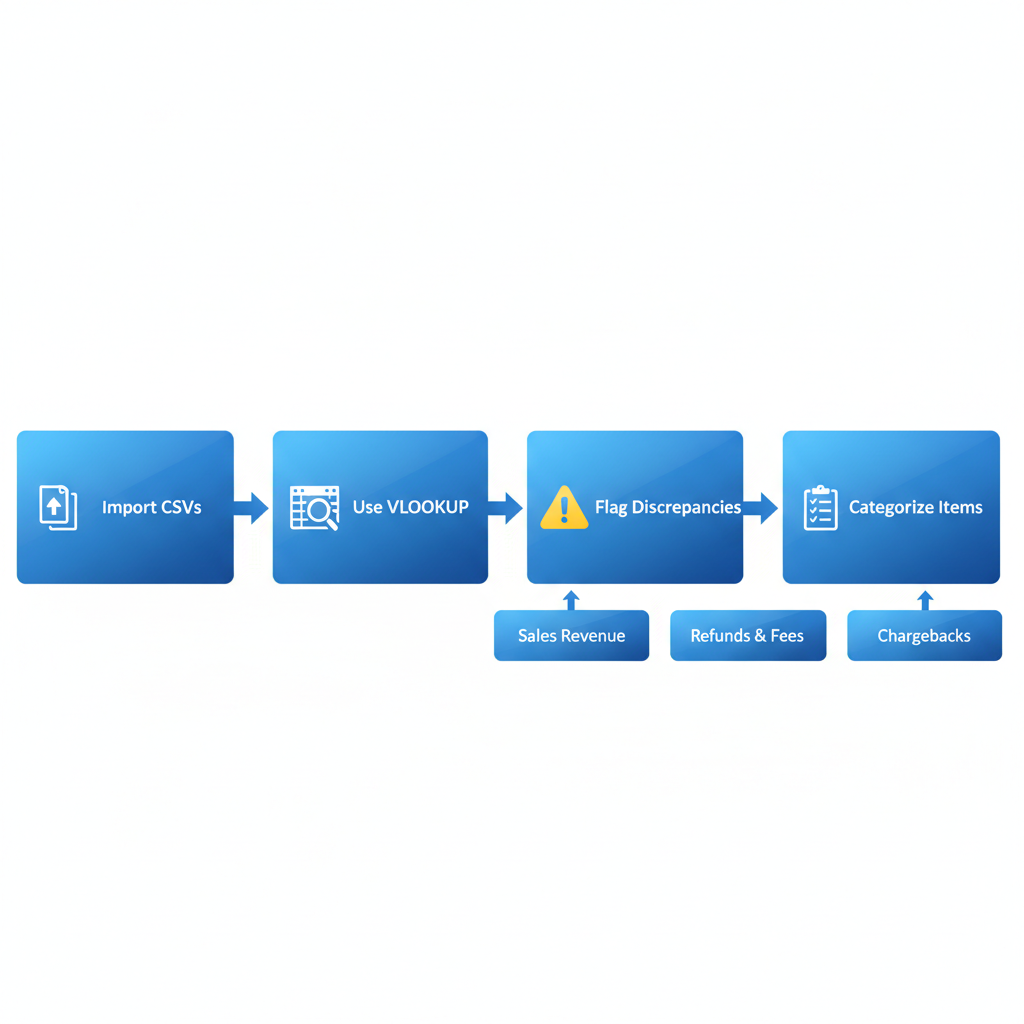
Process flow for matching transactions across Stripe, PayPal, and Shopify platforms
This step reduces reconciliation errors by up to 80%, as spreadsheet techniques streamline verification and prevent overlooked mismatches that could inflate reported revenue or trigger tax issues.
For advanced efficiency, explore INDEX-MATCH over VLOOKUP for bidirectional lookups, or preview automation tools like A2X integrations that handle these matches in bulk. These methods build skills for precise financial oversight, preparing for refinements in the next step.
Adjusting for Fees and Refunds
In Stripe and PayPal reconciliation for Shopify in Vancouver, Step 5 involves deducting processor fees and accounting for refunds to ensure your net deposit matches bank statements. After matching payouts from Step 4, review transaction reports to identify fees. For instance, Stripe typically charges 2.9% plus 30¢ per successful card charge in CAD, while PayPal fees for domestic transactions are around 2.9% plus 30¢, as compared in industry analyses. On a $100 CAD sale, this deducts approximately $3.20, leaving a net of $96.80 before refunds.
Instructions for Fee Calculations (70 words): Start by exporting detailed transaction CSVs from Stripe and PayPal dashboards. Sum gross sales from Shopify, then subtract fees using formulas like gross amount × fee percentage + fixed fee per transaction. For refunds, enter them as negative amounts in your spreadsheet to offset original sales. Adjust Shopify totals accordingly for Shopify Stripe reconciliation and PayPal Shopify reconciliation. Finally, reconcile the net figure against your bank CSV import to confirm accuracy.
This step is crucial for tax accuracy, as unadjusted fees can distort revenue reporting and lead to GST/HST miscalculations in Vancouver e-commerce accounting. See tax notes for further compliance details.
Tips for Bulk Adjustments (40 words): Use spreadsheet filters to batch-process refunds and fees, applying conditional formulas for efficiency. For high-volume stores, consider tools like A2X to automate fee deduction in Vancouver Shopify accounting, reducing manual errors.
With fees adjusted, proceed to Step 6 for automation to streamline future reconciliations.
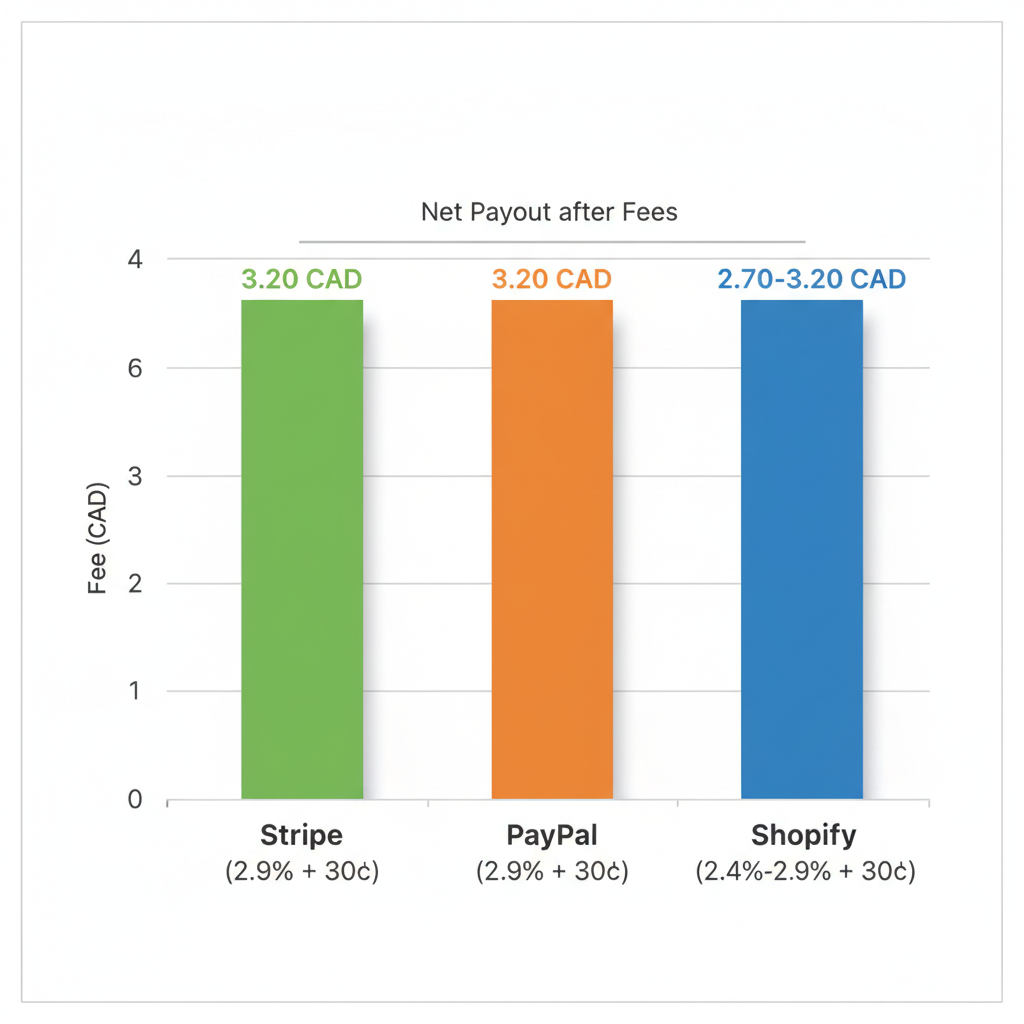
Comparison of processor fees for Canadian e-commerce transactions
This visual highlights how fee structures impact net payouts, aiding precise adjustments in your workflow.
Automating Reconciliation Workflows
For e-commerce businesses handling Stripe and PayPal reconciliation for Shopify in Vancouver, automation streamlines ongoing processes and minimizes errors. By integrating specialized apps, you can reduce manual data entry and ensure accurate financial tracking across sales channels.
To automate, start by installing apps like A2X or Link My Books directly through the Shopify App Store. Connect your Stripe and PayPal accounts by entering API keys, then enable auto-matching for Shopify Stripe reconciliation and PayPal Shopify reconciliation. Configure custom rules to categorize fees, refunds, and taxes automatically. Sync reconciled data to QuickBooks or Xero via built-in integrations, and test the setup using sample transactions to verify accuracy. This process typically takes under an hour and supports automated matching for Vancouver e-stores.
Automation matters for scalability as transaction volumes grow, saving hours weekly on manual reviews and allowing focus on business expansion. Transcounts supports these integrations, offering expert guidance for seamless setup.
For optimal results, fine-tune rules regularly based on refund patterns and fee structures. Monitor sync logs for discrepancies and update connections quarterly to maintain compliance with Canadian tax requirements.
Finalizing in Accounting Software
With Stripe and PayPal reconciliation for Shopify in Vancouver now streamlined through prior automation steps, the final phase involves importing reconciled data into your accounting software. This accounting sync for Vancouver Shopify sellers ensures seamless integration, closing the reconciliation cycle efficiently.
Import Process Instructions
Begin by exporting a CSV file from your reconciliation tool, capturing matched transactions for both Shopify Stripe reconciliation and PayPal Shopify reconciliation. In QuickBooks or Xero, navigate to the import function under the bank or sales module. Map columns accurately: assign revenue amounts to income accounts, fees to expense categories, and net payouts to bank deposits. For example, a typical journal entry might debit cash for $950 (net payout), credit sales revenue for $1,000, and debit payment fees for $50. Once imported, review for duplicates and run a trial balance to confirm accuracy. This process typically takes under 30 minutes for monthly volumes under 500 transactions.
Why It Matters for Compliance
Finalizing entries in accounting software guarantees accurate financial reporting, essential for Canadian businesses handling GST/HST. In Vancouver, where provincial sales tax aligns with federal rules, proper categorization prevents audit discrepancies and supports timely filings with the CRA.
Tips for Custom Rules
Set up automated rules in Xero or QuickBooks to auto-categorize recurring fees during imports, reducing manual effort. For Vancouver-specific needs, enable GST/HST tracking on imports to generate compliant summaries automatically. If mismatches persist, such as PayPal Shopify payment discrepancies or Stripe transaction variances, cross-check reports before final posting–this transitions smoothly into troubleshooting common issues.
Resolving Reconciliation Challenges
Stripe and PayPal reconciliation for Shopify in Vancouver often encounters hurdles like transaction mismatches, fee discrepancies, and multi-currency complications, especially for local e-commerce sellers dealing with Canadian dollars and cross-border sales. Fixing gateway discrepancies in Vancouver requires systematic diagnostics to maintain accurate financial records and avoid compliance issues with GST/HST mappings.
Here are common challenges and step-by-step fixes:
- ID Mismatches in Shopify Stripe Reconciliation: Transaction IDs may not align due to format differences. Check Shopify’s order IDs against Stripe’s payment IDs in your dashboard. Cross-reference by date and amount, then manually match in QuickBooks or Xero. For example, a Vancouver boutique might see unlinked $150 sales; verifying the prefix (e.g., ‘ord_’ vs. ‘pay_’) resolves 80% of cases.
- Fee Variances in PayPal Shopify Reconciliation: Recalculate PayPal’s 2.9% + $0.30 fees plus currency conversion rates for CAD transactions. Use the reference guide’s steps: log into PayPal, export detailed reports, and adjust for international fees. A common example is a $200 USD sale converting incorrectly to CAD, inflating costs by 1.5%; re-syncing data prevents this.
- Handling Refunds and Timing Delays: Trace refund statuses in both platforms–Shopify flags them as ‘refunded,’ while gateways show ‘captured’ or ‘voided.’ Adjust reconciliation dates to match posting times. For automation glitches, re-sync integrations via Shopify’s app settings. In Vancouver, tax mappings can delay this; enable auto-updates for provincial sales taxes.
Preventive tips include regular exports and custom rules for error resolution for Shopify payments. Watch for ecommerce bookkeeping mistakes like overlooked fees, which can lead to audit red flags. For complex cases, contact Transcounts at info@transcounts.com for expert Vancouver support.
Resolved issues ensure reliable records, paving the way for seamless growth in Canadian e-commerce.
Incorporating Tax and Compliance Elements
Building on the core reconciliation processes from Step 7, incorporating tax and compliance elements ensures seamless shopify tax setup canada us vancouver alongside Stripe and PayPal reconciliation for Shopify in Vancouver. This step focuses on tracking GST/HST for Canadian sales and sales tax for U.S. transactions, maintaining accuracy in cross-border e-commerce operations.
To integrate taxes effectively, begin by mapping tax lines directly in your Stripe and PayPal export files to align with Shopify’s reporting. Apply the standard 5% GST rate for Canadian transactions, adjusting for provincial HST variations as needed. Reconcile collected taxes against remitted amounts using automated tools that flag discrepancies, and monitor sales tax nexus thresholds to determine filing obligations in multiple jurisdictions. For Vancouver-based sellers, prioritize integration with platforms like TaxJar to automate rate calculations and filing reminders, ensuring every payment matches tax obligations without manual errors.
This tax-aligned payment matching in Vancouver is crucial for regulatory compliance, preventing penalties from the CRA or IRS that could arise from underreported taxes. It also safeguards your business reputation and supports smoother audits, especially for growing e-commerce operations handling international sales.
Key tips include regularly reviewing nexus rules for U.S. states based on sales volume, documenting all tax mappings for audit trails, and consulting with local experts for complex cross-border setups. Use Shopify’s built-in tax settings alongside Stripe and PayPal reconciliation tools to streamline Shopify Stripe reconciliation and PayPal Shopify reconciliation, minimizing compliance risks while optimizing cash flow.
Securing Accurate Financials for Your Shopify Store
Achieving Stripe and PayPal reconciliation for Shopify in Vancouver ensures your ecommerce operations run smoothly without discrepancies. By automating Shopify Stripe reconciliation and PayPal Shopify reconciliation, you streamline matching payments to orders, reducing manual errors and saving hours each month.
These processes deliver key benefits, including error-free books that boost compliance with Canadian tax regulations. Expect ROI through faster month-end closes and up to 95% accuracy post-reconciliation, as supported by best practices in ecommerce finance. For ongoing maintenance, regular audits maintain sustained payment accuracy in Vancouver. Regular reports and automated alerts help catch mismatches before they escalate into problems.
For scaled operations, partner with Transcounts, Vancouver’s experts in ecommerce bookkeeping. Implementing ecommerce bookkeeping best practices with our team guarantees precision and growth. Schedule a free consultation today at info@transcounts.com to empower your Shopify success.
Resources
Stripe PayPal Reconciliation for Shopify VancouverShopify Payouts VancouverPsp Fee Analysis Vancouver Ecommerce