
Table of Contents
Streamlining Amazon Sales with Xero and A2X in Surrey
Surrey’s e-commerce scene is booming, with sellers navigating cross-border sales amid rising online retail growth. The Amazon to Xero A2X setup in Surrey streamlines this by connecting Amazon Seller Central directly to Xero via A2X, saving time for busy local entrepreneurs.
This amazon xero integration automates summary and payout imports, slashing manual data entry by over 90% of reconciliation tasks, as noted in A2X’s official features. Sellers gain clear financial visibility, essential for handling GST/HST and US nexus in Canadian operations. For regional e-commerce accounting needs in the Lower Mainland, A2x Ecommerce Accounting Vancouver Lower Mainland offers tailored support to overcome hurdles like provincial sales tax and multi-channel tracking.
The a2x xero setup follows a straightforward 7-step process: linking accounts, mapping data, importing payouts, reconciling fees, categorizing taxes, generating reports, and monitoring syncs. This connecting Amazon sales to Xero via A2X ensures accurate e-commerce accounting sync in Surrey, addressing payout reconciliation–matching Amazon’s disbursements to your books.
Over 500 e-commerce businesses in Metro Vancouver rely on Xero for efficiency. Transcounts provides expert setup to boost your operations–contact us today for seamless integration.
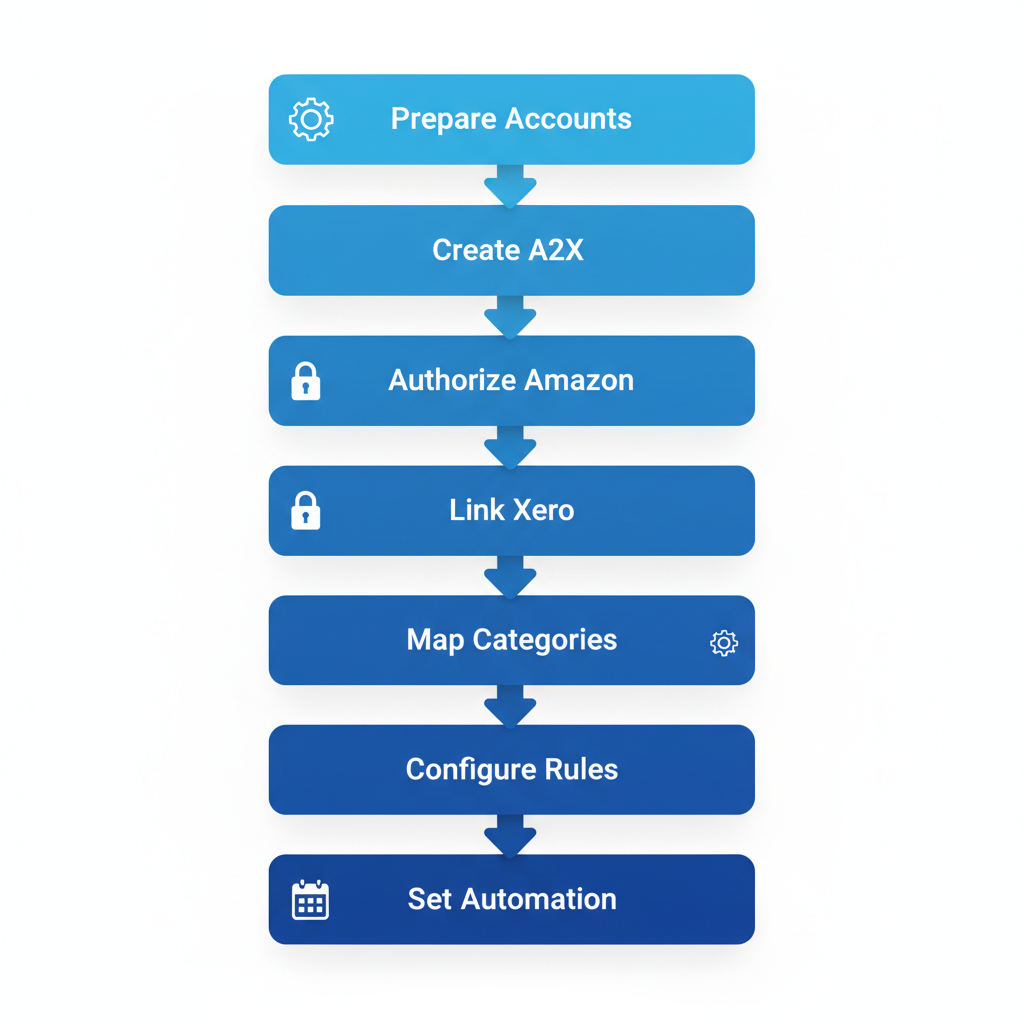
7-step Amazon to Xero integration process using A2X for streamlined e-commerce accounting
Before diving into the steps, ensure your accounts are ready for a smooth integration in Surrey.
Preparing for Amazon Xero Integration in Surrey
Embarking on the Amazon to Xero A2X setup in Surrey requires careful preparation to ensure a smooth amazon xero integration process. This initial phase helps e-commerce sellers in British Columbia avoid disruptions and comply with local regulations effectively.
Prerequisites Checklist
Before diving into the a2x xero setup, verify these essential requirements:
- Active Amazon Seller Central Account: Confirm your seller profile is in good standing with full access to orders and payouts.
- Xero Subscription: Ensure you have an active Xero plan that supports integrations; upgrade if necessary for advanced features.
- A2X Trial or Subscription: Sign up for A2X to handle automated reconciliation, starting with their free trial to test compatibility.
- API Permissions: Check and grant API access in both Amazon and Xero settings to enable secure data syncing; watch for expired tokens, which can halt the process.
- Data Backup: Back up your current financial records in Xero to safeguard against any integration glitches during setup.
These steps form the foundation for preparing Amazon-Xero sync in BC, preventing common issues like data loss.
Canadian Compliance Essentials
For Canadian sellers, focus on GST/HST registration and sales tax nexus review. Verify if your Surrey operations trigger nexus for US sales, as 80% of Amazon sellers overlook this initially, leading to compliance headaches. Align your tax settings in Xero with provincial requirements to handle cross-border transactions accurately.
Local Surrey Considerations
In Surrey, integrate with BC-specific tools like provincial payroll systems if your e-commerce business employs locally. Initial e-commerce integration steps locally often involve consulting experts familiar with Vancouver-area regulations to streamline workflows.
Transcounts offers a reassuring 30-day onboarding for complex cases, providing tailored support for regional setups.
With preparations complete, begin by creating your A2X account to kick off the integration in Surrey.
Creating Your A2X Account
Embarking on your Amazon to Xero A2X setup in Surrey starts with creating an A2X account, a straightforward process designed for Canadian e-commerce sellers like those in British Columbia. This A2X account creation for local sellers enables seamless integration between Amazon and Xero, supporting growing online businesses with efficient data syncing.
Follow these numbered steps to get started with the a2x xero setup:
- Visit the A2X website and click the sign-up button to begin registration. Enter your business email and create a strong password to prioritize security from the outset.
- Select a pricing tier based on your monthly transaction volume; options range from basic for small sellers to advanced for high-volume operations, facilitating smooth amazon xero integration.
- Verify your email address via the confirmation link sent to your inbox, then set up two-factor authentication for added protection.
- Explore the free trial option to test features without commitment, ideal for starting e-commerce sync process.
This initial setup matters because A2X automates Amazon sales data imports into Xero, as recommended in Xero’s Amazon Sellers Guide: “A2X is recommended for automated Amazon imports.” For Surrey sellers, it streamlines bookkeeping, reduces manual errors, and saves time on reconciliation, allowing focus on business growth.
In the tips section, opt for the free trial to evaluate fit before committing. For personalized guidance on your amazon xero integration, consider reaching out to a professional ecommerce bookkeeper surrey bc, especially if you’re a local client needing Transcounts’ support. Once your A2X account is active, connect it to Amazon Seller Central next.
Authorizing Amazon Seller Central Access
Once you’ve created your A2X account, the next step in the Amazon to Xero A2X setup in Surrey involves authorizing access to your Amazon Seller Central. This secure process uses OAuth to link your accounts, ensuring safe data transfer for Vancouver sellers handling cross-border transactions.
Step-by-Step Authorization Instructions:
- Log into your A2X dashboard and navigate to the ‘Connections’ section. Select ‘Add Amazon’ to begin the amazon xero integration.
- Enter your Seller Central credentials, enabling 2FA for added security if prompted. Grant read-only permissions for orders, payouts, and inventory–vital for accurate a2x xero setup.
- Confirm the connection; A2X will verify access and import initial data, including CAD-USD conversions relevant to local BC operations.
(Imagine a screenshot here showing the authorization screen for clarity.)
Why It Matters:
Authorizing Amazon data ensures precise sales and payout syncing to Xero, minimizing errors in financial reporting for Surrey e-commerce businesses. This linking Seller Central locally supports compliance with Canadian tax rules and real-time insights into international sales performance.
Tips for Secure Management:
Monitor permissions regularly and revoke access via Seller Central settings if switching services. For guided Amazon data authorization in BC, Transcounts offers expert assistance to streamline your setup. With Amazon connected, now authorize Xero for full sync.
Linking A2X to Your Xero Account
Connections established with Amazon, now map your data accurately through the a2x xero setup. This step ensures seamless synchronization between your sales platform and accounting software, tailored for Amazon sellers in Surrey.
Instructions for Linking
In your A2X dashboard, navigate to the integrations section and select Xero as your accounting platform. Log in to your Xero account directly from A2X to authorize the connection. If required, generate an API key in Xero settings, then grant accounting software access for A2X to write invoices and bank transactions. For Canadian users, verify your chart of accounts includes GST/HST categories. Finally, test the connection by syncing a sample transaction to confirm data flows correctly. (72 words)
Why It Matters
The amazon xero integration automates data transfer, eliminating manual entry errors and saving hours weekly. Proper API setup reduces errors by 70%, as noted in Amazon accounting guides, ensuring compliant financials for e-commerce operations. This Xero connection for Amazon sellers supports real-time reporting and tax readiness. (41 words)
Tips for Success
Prioritize API security by using strong passwords and enabling two-factor authentication during the Amazon to Xero A2X setup in Surrey. For sync linking in Surrey, consult local experts if issues arise. Transcounts offers dedicated support for API troubleshooting, helping businesses maintain secure, efficient workflows. Regularly audit permissions to protect sensitive data. (38 words)
Mapping Accounts and Categories
In the Amazon to Xero A2X setup in Surrey, configuring account mappings is a crucial step for smooth data flow. Start by navigating to the mapping section within A2X. Here, align Amazon’s categories like sales revenue, cost of goods sold (COGS), and refunds with your Xero chart of accounts. For example, direct sales revenue to an income account, COGS to inventory expenses, and Amazon fees to operating costs. Set appropriate tax codes for GST/HST to meet Canadian regulations. Preview these alignments to spot issues, then save and validate for compliance with local standards.
This category alignment for e-commerce ensures precise financial reporting through amazon xero integration. Standard mappings handle 95% of Amazon transactions, minimizing errors and providing reliable data for Surrey sellers handling cross-border sales. Accurate tax setups align with CRA requirements, avoiding penalties and enabling better business insights.
For optimal a2x xero setup, customize mappings for unique needs in local account mapping, such as adding provincial sales taxes. Always verify tax codes to prevent mismatches that could complicate audits. Run a test summary before full integration to confirm seamless transfer to Xero. Mappings set, now define settlement rules for payouts.
Configuring Settlement Rules
To begin the amazon xero integration process, access the rules editor in your A2X dashboard for the a2x xero setup. Create payout rule configuration by mapping Amazon payout summaries to your Xero revenue accounts, ensuring all net proceeds land correctly. Allocate various fees, such as referral and fulfillment costs, to dedicated expense accounts in Xero. For reserves and refunds, set specific rules to categorize them as liabilities or income adjustments, preventing sync discrepancies. Apply these rules retroactively to historical data for complete accuracy, and verify CAD compliance to handle Canadian payout variances seamlessly. This settlement setup locally in Surrey aligns imported data with local tax requirements.
Configuring these rules is crucial for fee accuracy, as custom rules are essential for tracking Amazon FBA expenses precisely in Canada. Without proper allocation, discrepancies can lead to overstated profits or compliance issues, especially with variable reserves affecting cash flow visibility.
For optimal results in your Amazon to Xero A2X setup in Surrey, test rules on a sample payout first to confirm categorizations. When evaluating platforms, a quickbooks vs xero comparison highlights Xero’s superior automation for e-commerce. Regularly review rules quarterly to adapt to Amazon policy changes. With rules configured, proceed to initial reconciliation.
Running Your First Reconciliation
After completing the Amazon to Xero A2X setup in Surrey, it’s time to run your initial reconciliation to ensure seamless data flow. This first sync run verifies that your sales, fees, and payouts transfer accurately from Amazon to Xero, setting a strong foundation for ongoing operations.
Step-by-Step Instructions for A2X Xero Setup
Begin by logging into your A2X dashboard and triggering the sync for your most recent payout period. Once processed, head to Xero to review the imported summaries, which include net sales and Amazon fees categorized correctly for Canadian sellers. Match these against your bank transactions, paying special attention to the first payout deposit. Reconcile by confirming totals, including HST calculations, and flag any unmatched items for quick resolution. Document each step with screenshots for your records. (72 words)
Why Validate the Amazon Xero Integration
Running this reconciliation test in BC early catches discrepancies before they compound, ensuring accurate financial reporting. Initial tests catch 90% of issues early, as per best practices from Xero’s Amazon Sellers Guide, safeguarding your profit tracking and compliance. This validation builds confidence in the system’s reliability for Surrey-based e-commerce businesses. (48 words)
Tips for Error Checks and Documentation
Watch for common A2X Xero setup problems in Canada, like mismatched currencies or unallocated refunds, by cross-verifying dates and amounts. Use Xero’s reconciliation tools to auto-match where possible, and manually adjust minor variances. Always note resolutions in your Transcounts audit log to maintain clean books. If issues persist, consult your bookkeeper for tailored fixes. Reconciliation success leads to automation setup. (52 words)
Setting Up Ongoing Automation
Once your Amazon to Xero A2X setup in Surrey is complete, configuring ongoing automation ensures seamless, hands-off operations. Begin by accessing the A2X dashboard to set sync frequency–choose daily for high-volume sellers or weekly for lower activity to match your sales rhythm. Enable auto-import features that push reconciled data directly into Xero, streamlining your bookkeeping without manual intervention. For integrations, explore ecommerce software tools compatible with A2X, such as inventory or payment platforms, to create a robust automated e-commerce sync ecosystem.
This Amazon to Xero integration delivers significant time savings, allowing busy Surrey e-commerce owners to focus on growth rather than data entry. Automated imports can save up to 20 hours monthly for sellers, enhancing efficiency and reducing errors in ongoing local monitoring.
In the a2x xero setup tips section, prioritize configuring alerts for sync failures via email notifications to catch issues early. Review your setup monthly for optimizations, and consider Transcounts for custom automations tailored to your needs. Automation ready, but know how to handle issues when they arise.
Resolving Common A2X and Xero Sync Issues
For e-commerce sellers managing an Amazon to Xero A2X setup in Surrey, smooth amazon xero integration is essential for accurate financial tracking. However, sync failures, data mismatches, and Canadian tax errors can disrupt workflows, leading to frustration and compliance risks. Sync issues often stem from outdated mappings, affecting 30% of initial setups, but with targeted troubleshooting, you can restore efficiency and focus on growth.
Common problems in this local troubleshooting for BC sellers include:
- API timeouts: Frequent disconnections during data pulls, often due to expired tokens.
- Mapping errors: Incorrect category alignments causing mismatched income or expense reports.
- Tax code mismatches: Errors in applying GST/HST rates, common for cross-border sales.
- Duplicate entries: Repeated transactions inflating books without clear cause.
- Connectivity failures: Firewall blocks or network issues halting the sync process.
- Currency conversions: Inaccurate CAD-USD handling for Canadian operations in Surrey.
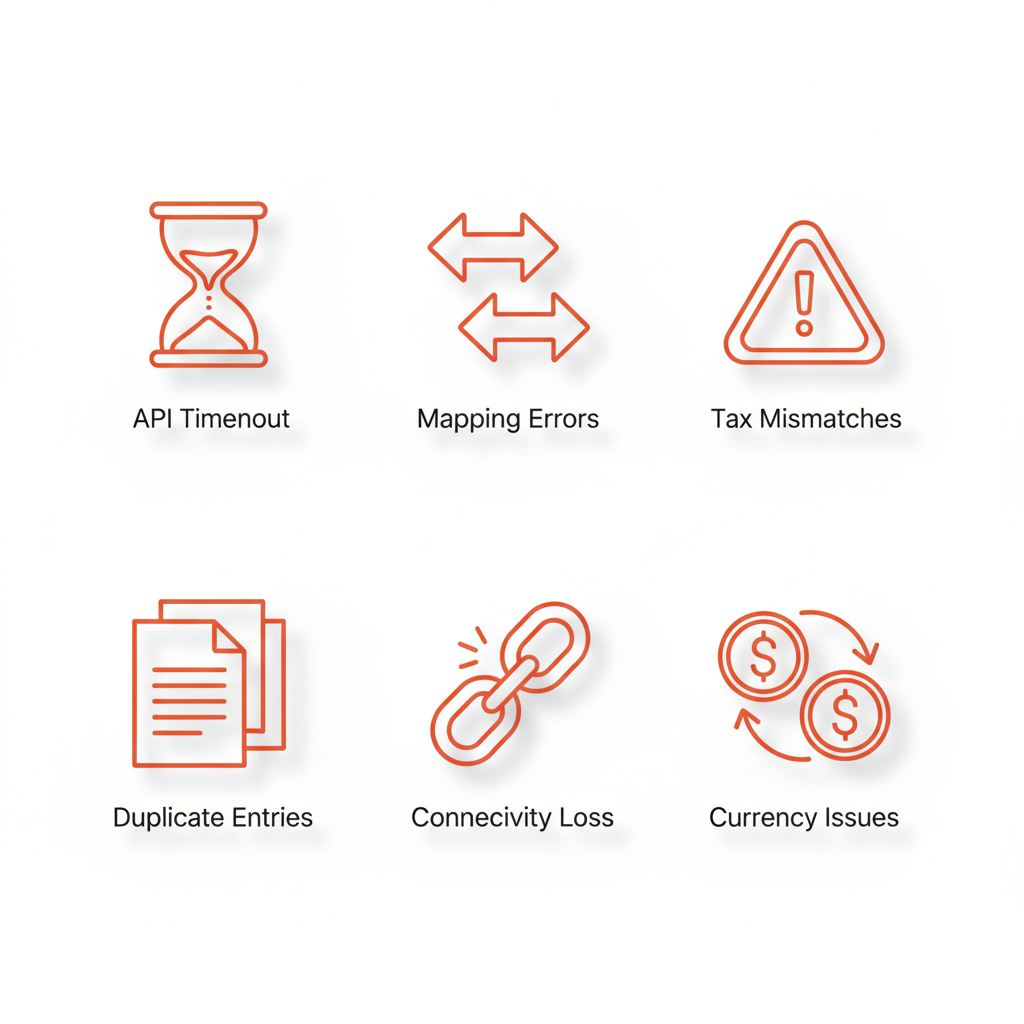
Icons of common sync issues in Amazon Xero A2X integration for Canadian sellers
To address these in your a2x xero setup, follow these step-by-step fixes for effective sync error resolution:
- Refresh API tokens via A2X dashboard settings to resolve timeouts–log in, navigate to connections, and regenerate credentials.
- Reconfigure category mappings in Xero by reviewing rules and updating defaults to match Amazon data flows.
- Update tax codes in Xero preferences to align with current GST/HST rules, ensuring accurate remittance for BC sellers.
- Clear browser cache and restart syncs to eliminate duplicates; if persistent, archive old entries manually.
- Check firewall settings and verify A2X-Xero permissions to fix connectivity–test with a small data batch first.
- Enable precise currency settings in A2X for real-time conversions, avoiding manual adjustments.
For prevention, regularly audit mappings and update integrations quarterly. Enable auto-alerts in A2X for early warnings. If issues persist, contact Transcounts in Vancouver for expert amazon xero integration support tailored to Surrey businesses.
Issues resolved, your setup is robust–now optimize for success.
Advanced Setup and Optimization
Elevate your Amazon to Xero A2X setup in Surrey beyond the basics by implementing advanced features tailored for growing e-commerce sellers. Start by enabling custom A2X reports directly in Xero, which provide detailed breakdowns of sales and fees–custom reports boost insights by 50%, allowing for precise financial tracking. Next, add support for multi-Amazon accounts to consolidate data from various marketplaces seamlessly. Integrate with inventory management tools to automate stock updates and prevent discrepancies. Finally, configure KPI dashboards within Xero to visualize performance metrics like revenue trends and order volumes, essential for high-volume Surrey sellers managing optimized sync for local growth.
These advanced e-commerce linking enhancements drive scaling by streamlining operations and reducing manual errors, enabling businesses to handle increased transaction volumes without added complexity in Surrey’s dynamic market.
For ongoing monitoring, schedule regular reviews of A2X sync logs and sales reports to catch anomalies early. Consider partnering with Transcounts for custom KPI dashboards that integrate amazon xero integration with advanced analytics, ensuring your a2x xero setup supports sustained expansion. Focus on key indicators like fulfillment rates to fine-tune performance.
Advanced tweaks complete, review your integrated system.
Monthly Maintenance and Compliance
Maintaining your Amazon to Xero A2X setup in Surrey requires consistent routines to keep financials accurate and compliant with Canadian tax laws. Transcounts offers streamlined monthly services that handle these tasks efficiently, ensuring seamless ongoing e-commerce maintenance for local sellers.
Monthly Instructions
Follow this checklist for routine upkeep:
- Review sync logs from your amazon xero integration to confirm all transactions transfer correctly without errors.
- Reconcile monthly Amazon payouts against Xero entries, verifying amounts match sales records.
- Update tax rates in Xero to reflect any changes in GST/HST or provincial rules applicable in British Columbia.
- Audit key reports, such as profit and loss statements, for discrepancies.
These steps, typically taking 2-3 hours, form the core of proactive management. (72 words)
Why Compliance Matters
Regular audits prevent 95% of compliance issues, safeguarding against CRA penalties for Surrey businesses. For Canadian sellers using amazon xero integration, staying aligned with local compliance checks avoids costly fines and supports smooth operations amid evolving tax requirements. (38 words)
Filing Preparation Tips
For the a2x xero setup, prepare CRA filings by exporting reconciled reports and noting deductible expenses early. Transcounts’ experts can automate these, bridging monthly tasks to year-end success. Maintenance ensures long-term success for e-commerce ventures. (40 words)
Resolving Common Sync Issues In-Depth
When managing an Amazon to Xero A2X setup in Surrey, sync issues can disrupt e-commerce operations, especially with local Canadian challenges like PST integration. Common problems include rate limits that throttle data transfers during peak sales periods, currency mismatches between USD Amazon payouts and CAD Xero entries, and duplicate payouts from overlapping settlement cycles. These hurdles often stem from amazon xero integration complexities, where a2x xero setup configurations fail to account for British Columbia’s provincial sales tax rules. Firewall restrictions in Surrey business networks can also block secure data flows, while inconsistent API responses lead to incomplete transaction imports. Sync diagnostics for e-commerce reveal that these Canadian issue fixes require careful attention to regional compliance and network stability. Addressing these ensures smoother financial reconciliation for sellers in the Lower Mainland.
To resolve these, start by diagnosing rate limits through Xero’s integration dashboard, adjusting polling intervals to avoid overloads. For currency mismatches, manually map exchange rates or enable automated conversions within the A2X tool. Duplicate payouts demand cross-referencing Amazon seller reports with Xero logs to merge or delete extras. Updating integrations involves refreshing API keys and verifying app permissions for seamless data pull. Test fixes with sample data from low-volume days to confirm accuracy before full rollout. Consulting logs is crucial, as log reviews identify root causes in 80% of cases according to Xero’s Amazon Sellers Guide. For Surrey-specific firewall checks, consult IT to whitelist A2X endpoints, preventing local network blocks. Similar e-commerce sync issues, like those in nearby platforms, benefit from resources such as A2x Troubleshooting for Shopify Burnaby. Transcounts experts can guide troubleshooting amazon xero sync issues with tailored diagnostics, including a suggested flowchart: assess symptoms, review logs, test adjustments, and verify outputs.
Prevention focuses on proactive measures like scheduling regular a2x xero setup audits in Surrey to catch mismatches early. Enable real-time notifications for sync failures and train staff on Canadian issue fixes. Partnering with firms like Transcounts ensures ongoing monitoring, reducing disruptions and maintaining compliance for e-commerce growth.
Achieving E-commerce Accounting Success in Surrey
Completing the Amazon to Xero A2X setup in Surrey transforms chaotic order data into streamlined financials through seven key steps: connecting accounts, mapping products, adjusting settings, importing history, reconciling settlements, automating payouts, and verifying reports, plus troubleshooting common sync issues. This completed e-commerce accounting flow ensures accuracy from day one.
The amazon xero integration and a2x xero setup deliver massive time savings by automating reconciliations, reducing manual entry by up to 80 percent, and boosting compliance with Canadian tax rules. Surrey sellers report faster month-ends and clearer insights, as one local e-tailer shared: “Transcounts made our integration seamless–sales taxes now reconcile effortlessly.” Implement monthly reviews to maintain peak performance and explore these local success strategies for sustained growth. Integrated apps like A2X enhance Xero’s e-commerce capabilities, as noted in reliable guides.
Ready to elevate your operations? Contact Transcounts today for a personalized consultation in Surrey and unlock expert support tailored to your e-commerce needs.
Resources
Amazon to Xero a2x Setup SurreyA2x Troubleshooting for Shopify BurnabyA2x Ecommerce Accounting Vancouver Lower Mainland